
Selling photography on Etsy can give your images a new life beyond your portfolio. You can offer digital downloads, printed artwork, or photo-based products, and use Pinterest to help potential buyers discover your work.
But uploading a few photos does not guarantee sales. You need to choose a clear audience, make it easy for shoppers to understand what they are buying, and price your work with fees and expenses in mind.
In this guide, I’ll explain how to make money selling photography on Etsy, what types of photography products you can offer, and how to promote your shop with Pinterest.
🎁 Free: 10 editable Canva Pin templates
The same Pin designs we use to get traffic from Pinterest. Swap in your text and photos and you have a ready-to-post Pin in minutes.
👉 Get the free templates (or get all 60 premium templates for $19)
Can You Sell Photography on Etsy?
Yes. Etsy allows sellers to offer original designs and digital items, as long as their listings follow Etsy’s policies. Photographers can sell downloadable image files, physical prints, or original photo-based products.
Etsy says digital items may be premade files or files created and delivered to a buyer after purchase. Review Etsy’s Creativity Standards before opening your shop.
Make sure you own the rights to every image you sell. If a photo includes a recognizable person, private property, artwork, or another protected subject, check whether you have the permissions needed for the way you plan to use it.
Etsy can remove listings reported for intellectual-property violations, so do not use someone else’s photographs or designs without permission. Etsy’s Intellectual Property Policy
What Photography Products Can You Sell on Etsy?
1. Digital Photo Downloads
Sell a high-resolution image that buyers can download and print themselves. Popular themes include landscapes, flowers, architecture, travel scenes, and minimalist photography.
Be precise about the file sizes and aspect ratios included. Explain that the buyer receives a digital file and no physical print will be shipped.
Etsy’s digital listing tools currently allow up to five files per listing, with a maximum size of 20 MB per file. If your files are larger, you may need to prepare them differently while still following Etsy’s rules for digital delivery. Etsy’s guide to digital listings
2. Printed Photography
You can sell physical prints that you make and ship yourself, or work with a production partner that prints and ships your original work. Make the size, paper type, finish, and framing details clear in the listing.
Use accurate product images so shoppers can judge the colors and style.
If a print is unframed, say so. If you use a production partner, follow Etsy’s rules and disclose the partner where required.
3. Photo Bundles
A themed bundle can give buyers several images that work together. For example, you could offer a set of coastal photographs, botanical images, or neutral-toned landscapes.
Keep the bundle cohesive and show a preview of every included image. State how many files the customer receives and what license applies to their use.
4. Photo-Based Products
Your photography can also be part of a product such as a calendar, greeting card, journal cover, or wall-art set. This gives shoppers a finished item instead of only a photo file.
Think about how the product will be used and what details customers need before ordering.
For a calendar, show the layout and months included. For a card, state whether an envelope is included.
How to Start Selling Photography on Etsy
Step 1: Choose a Specific Photography Niche
Start with a subject or style you can create consistently. “Photography prints” is very broad.
A narrower shop could focus on desert landscapes, black-and-white city photography, or colorful botanical prints.
A clear niche helps shoppers understand what your shop is about and makes it easier to create matching listings and Pinterest content.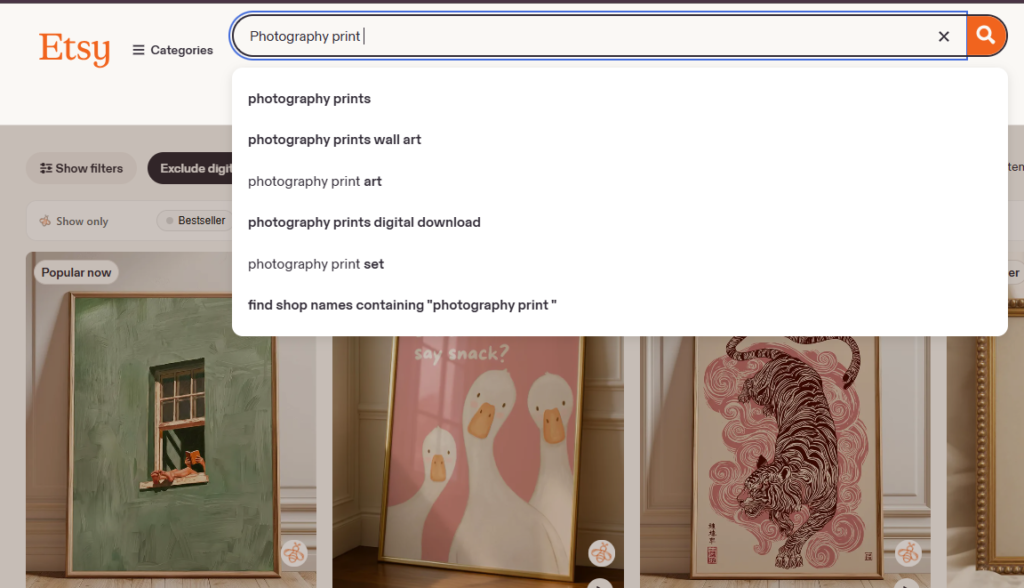
Step 2: Research What Buyers Are Searching For
Search Etsy for phrases related to your images and study the listings that appear. Pay attention to the language sellers use, how they present their work, and the questions buyers ask in reviews.
Look for ways to make your offer clearer or more useful.
This might mean adding more print ratios, showing a realistic preview, or creating a collection for a specific room or decorating style. Competitor research can give you ideas, but your photos, descriptions, and product design should be your own.
Step 3: Prepare Your Files Carefully
For digital downloads, export high-quality files and test them before uploading. Use clear filenames, check that the image opens correctly, and make sure the resolution is suitable for the print sizes you advertise.
Include a simple instruction sheet if buyers may need help downloading, printing, or choosing a print size.
Etsy’s Seller Handbook recommends making digital listings clear so shoppers understand exactly what they are purchasing. Etsy’s digital-download guide
Step 4: Create a Clear Listing
Write a title that describes the subject, style, and product type. For example, “Coastal Landscape Photo Print, Blue Ocean Wall Art” tells a shopper more than “Ocean Mood.” Use relevant phrases naturally in your description and tags.
Your description should answer common questions:
- Is this a digital download or a physical print?
- What file formats, sizes, or ratios are included?
- Does the order include a frame or printed copy?
- What uses does the license allow?
- How will a physical item be printed and shipped?
Step 5: Show the Product Accurately
Use a main image that makes the photograph easy to see. Add previews that show the artwork in context, but do not let mockups hide what the customer will actually receive.
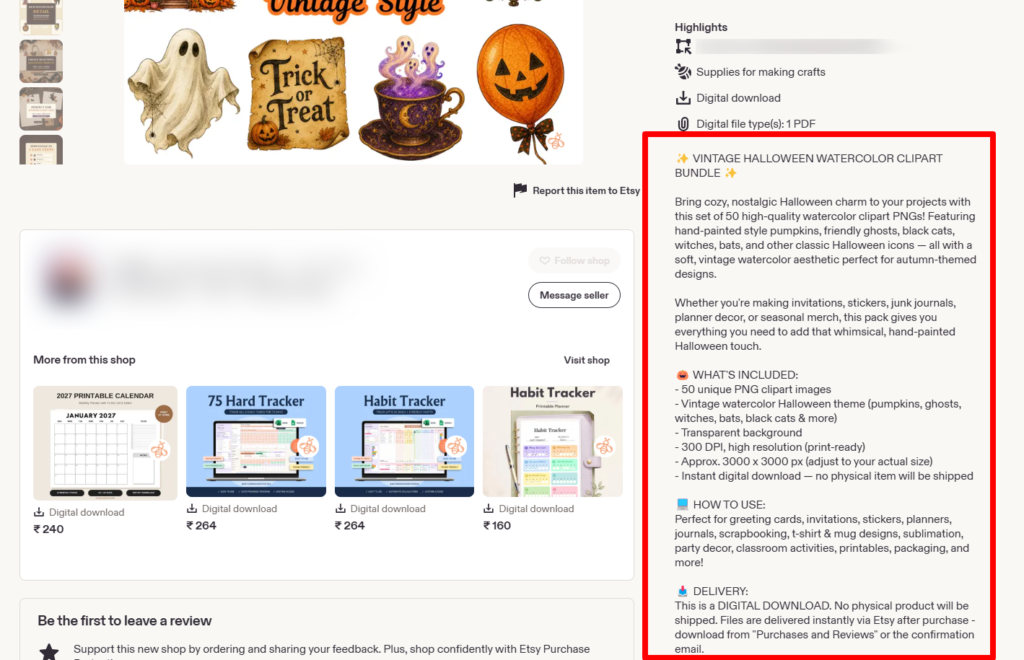
For digital products, include a visual preview or excerpt of the files in the listing images. Etsy’s listing-image rules require sellers to have the necessary rights to the photos they upload and to represent digital items accurately. Etsy’s listing image requirements
For a digital listing, add a clear note such as “Digital download only – no physical item will be shipped.” Etsy’s Seller Handbook also recommends making it obvious when a product is a download, since some shoppers may otherwise expect a finished physical item. Read Etsy’s tips for digital listings.
Step 6: Set a Price That Accounts for Costs
Compare similar products, but do not copy their prices without considering your own costs and offer. For physical prints, account for printing, packaging, shipping, and any production-partner charges. For digital downloads, include your time creating and preparing the files, along with marketplace and payment fees.
Etsy charges a 6.5% transaction fee on the order amount, and other fees may apply, including listing and payment-processing fees. Check the current fee schedule for your country before setting prices. Etsy fees and taxes
Step 7: Offer a Useful License
Explain what customers can and cannot do with your photograph. For example, your license might allow personal printing while prohibiting resale, redistribution, or use in products for sale. Choose terms that fit your work and make them easy to find in the listing.
If you are unsure about the legal wording for your license, seek qualified legal advice. Do not assume that a buyer automatically receives commercial rights just because they purchased a digital file.
How to Promote Your Etsy Photography Shop on Pinterest
Pinterest can help people discover photography while searching for decorating ideas, gift inspiration, or print styles. Create Pins that show the image clearly and use titles that describe the photograph and how someone might use it.
For example, a landscape image could have one Pin titled “Misty Mountain Photo Print for a Calm Bedroom” and another focused on “Neutral Nature Wall Art for a Living Room.” Link each Pin to the exact Etsy listing or a relevant page on your website.
- Use vertical Pin designs that show the photograph prominently.
- Create a few different designs for each listing, with distinct text and layouts.
- Write descriptive Pin titles and descriptions using natural search phrases.
- Organize Pins on relevant boards, such as landscape photography prints or botanical wall art.
- Track outbound clicks and sales, not only impressions.
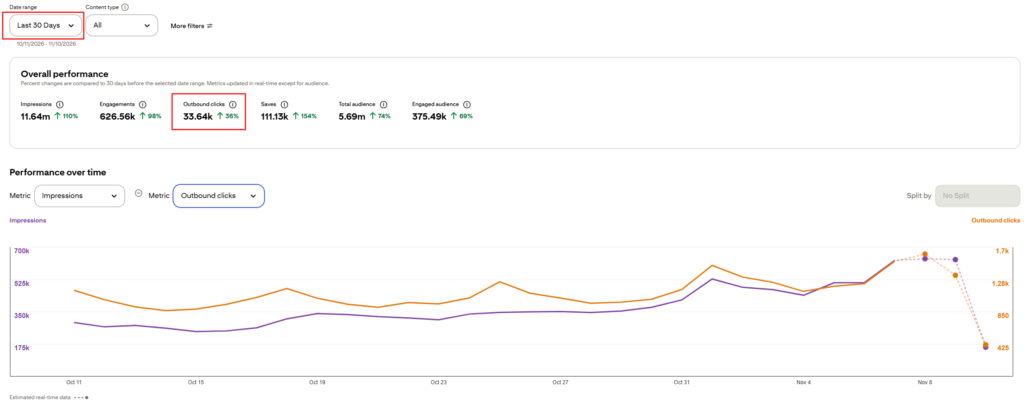
For more ideas, see our step-by-step guide on how to use Pinterest to boost Etsy sales. You can also learn the basics of Pinterest SEO and Pinterest keyword research.
Want a step-by-step Pinterest plan?
Get our free Pinterest strategy PDF for guidance on setting up your account, creating Pins, and working toward your first $500. It’s an action plan, not a promise of earnings.
Would a Blog Help You Sell More Photography?
An Etsy shop gives you a place to list your work. A blog gives you room to explain the story behind your photography, answer buyer questions, and create useful content that can bring in search traffic.
For example, a photographer selling landscape prints could write about choosing wall art for a small room or decorating with nature photography. Pinterest Pins can link to those articles, which can then guide interested readers to relevant Etsy listings.
If you want to build a website alongside your shop, start with our guide on how to start a blog. We recommend Hostinger for hosting.
Common Mistakes to Avoid
- Uploading photos without checking the rights. Sell images you created or have permission to use.
- Leaving out file details. Tell buyers the sizes, formats, and print ratios they receive.
- Making a digital product look physical. Clearly label downloads and show accurate previews.
- Ignoring fees and expenses. Calculate your likely net earnings after marketplace fees and production costs.
- Using vague titles. Describe the subject and the type of product so shoppers can quickly understand the listing.
- Expecting instant income. Sales depend on demand, competition, product presentation, pricing, and promotion. Keep improving your listings based on what shoppers click and buy.
Final Thoughts
You can make money selling photography on Etsy by turning your images into digital downloads, prints, bundles, or photo-based products. The key is to make the offer clear: choose a recognizable style, prepare reliable files, describe the license, and show shoppers exactly what they will receive.
Then use Pinterest to bring relevant people to your listings. Test different Pin designs, learn from clicks and sales, and improve the product pages over time. A photography shop takes work to build, but a focused collection and a good customer experience give you a stronger foundation.
Frequently Asked Questions
Do I need a professional camera to sell photography on Etsy?
No. Buyers care about the quality and usefulness of the final image, not only the camera used. Make sure the file is sharp, properly edited, and suitable for the print sizes you offer.
Can I sell the same photo as a digital download and a print?
You can offer different formats for your original work, provided each listing clearly explains what the customer receives and follows Etsy’s policies. Consider using separate listings if that makes the format and delivery clearer to shoppers.
How many files can I upload to an Etsy digital listing?
Etsy currently allows up to five files per digital listing, with a 20 MB limit for each file. Check Etsy’s current help documentation in case its upload limits change. Etsy digital listing instructions
Can Pinterest help sell photography on Etsy?
Yes. You can create Pins featuring your photographs and link them to relevant Etsy listings or helpful blog posts. Use accurate descriptions and measure outbound clicks and sales to see which Pins attract potential customers.
Want Pinterest traffic without doing the pinning?
Our team at ThriversEdge handles keyword research, Pin design and scheduling for bloggers and online sellers. Start with a $99 account audit, get Pins designed from $1 each, or hand over the whole account.
Note: Some of the links on this page are affiliate links, which means we may earn a small commission if you choose to make a purchase through them-at no extra cost to you. We only recommend products and services we genuinely believe in and find useful.