
Selling a digital product can be a practical way to earn online. You create something useful, such as a guide, template, planner, or workbook, and sell it through a marketplace or your own website.
But your first product doesn’t need to be huge or perfect. The best place to start is with one specific problem people already want to solve. Then you can create a simple solution, get it in front of the right audience, and improve it based on real feedback.
In this guide, I’ll walk you through how to sell your first digital product and how a blog can help you build a steady source of traffic over time. I’ll also show you the sales math behind a $1,000 monthly goal. That goal is possible for some creators, but it is not guaranteed and may take time.
Affiliate disclosure: This article contains a Hostinger affiliate link. If you purchase through it, we may earn a commission at no extra cost to you.
🎁 Free: 10 editable Canva Pin templates
The same Pin designs we use to get traffic from Pinterest. Swap in your text and photos and you have a ready-to-post Pin in minutes.
👉 Get the free templates (or get all 60 premium templates for $19)
What Is a Digital Product?
A digital product is a file, resource, or online experience that customers can access digitally. It doesn’t need to be shipped like a physical product. Depending on what you create, customers may download it, access a template, or log in to a course or membership.
Common digital products include:
- eBooks and step-by-step guides
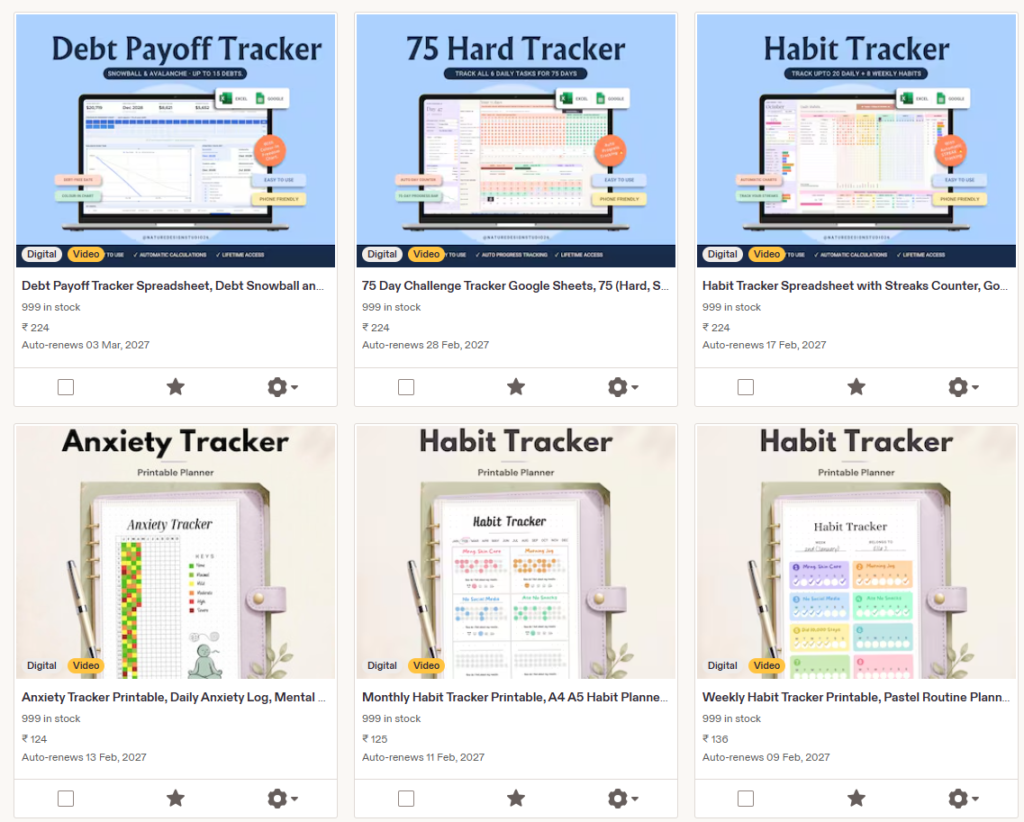
- Printable planners and trackers
- Canva templates and social media graphics
- Workbooks, checklists, and spreadsheets
- Online courses and recorded workshops
- Patterns, presets, and creative resources
If you need inspiration, explore our list of digital product ideas you can sell online.
How to Sell Your First Digital Product
1. Start With a Problem, Not Just a Product Idea
It’s tempting to start by asking, “What can I make?” A better question is, “What does my audience need help with?” People are more likely to buy a product when they understand what problem it solves.
For example, “a meal planner” is a broad idea. A more specific version might be “a weekly meal planner for busy parents who want to prepare simple dinners.”
The more clearly you define the audience and problem, the easier it is to decide what to include and how to describe the product.
Look for signs of demand before investing a lot of time. You might:
- Read questions in relevant online communities and social media comments.
- Review the questions people ask on your blog or email list.
- Look at popular products in marketplaces and read customer reviews.
- Ask potential buyers what they find difficult or time-consuming.
Competitor research can help you understand what already exists. Use it to identify gaps, improve the format, or serve a more specific audience.
Don’t copy another seller’s product, text, design, or branding.
2. Choose a Product You Can Finish
Your first digital product can be small. It might be a 10-page guide, a checklist, a budget spreadsheet, or a focused pack of templates.
A useful, finished product is a better starting point than a large project that takes months to complete.
Decide what a customer should be able to do after using it. Then include only the information and tools that help them reach that outcome.
For example, a product about organizing a small pantry might include:
- A simple inventory sheet
- A step-by-step sorting checklist
- Storage suggestions for different pantry sizes
- A maintenance plan for the next month
Keep your first version focused. You can add extra sections or create a larger bundle after you learn what buyers ask for.
3. Create and Check Your Product
You can create an eBook or workbook in a document editor, design templates in Canva, or make a spreadsheet in Google Sheets or Excel.
Choose a format that fits the product and is easy for your customer to use.
Before you publish, check the product from the buyer’s point of view:
- Does it solve the problem described on the sales page?
- Are the instructions clear?
- Do the links and editable templates work?
- Does it look good on a phone as well as a computer?
- Have you checked spelling, page order, and file quality?
If you’re selling Canva templates, read our guide on how to make money by selling Canva templates for product and packaging ideas.
4. Choose Where to Sell It
You can sell through a marketplace or through your own website. A marketplace may make it easier to list a product and accept orders, but you’ll need to review its fees, rules, and customer policies.
With your own website, you have more control over the sales page and customer experience, but you’re responsible for setting up the site and attracting visitors.
Well, at the starting we would recommend to sell on Etsy or platform like Gumroad.
Whichever option you choose, make sure customers can easily understand:
- What the product includes
- Who it is designed for
- What file format they will receive
- How they will access the product after purchase
- What support or refund policy applies
5. Set a Price That Makes Sense
Your price should reflect the product’s usefulness, depth, audience, and the alternatives available. You can research similar products, but don’t choose a price based only on what another seller charges.
It can help to start with one straightforward offer. If customers find the product useful and ask for more, you can later create a bundle, an expanded version, or a related product.
Think about the sales math behind your income goal. To generate $1,000 in gross sales in a month, you would need roughly:
| Product price | Approximate sales for $1,000 gross |
|---|---|
| $10 | 100 sales |
| $20 | 50 sales |
| $25 | 40 sales |
| $50 | 20 sales |
This is gross revenue, not take-home profit. Platform and payment processing fees, refunds, taxes, advertising, and other costs can reduce what you keep.
The table also doesn’t mean that a particular number of sales is guaranteed.
6. Write a Clear Product Page
Your product page should help a potential customer decide whether the product is right for them. Explain the result it helps with, what’s included, and how it works.
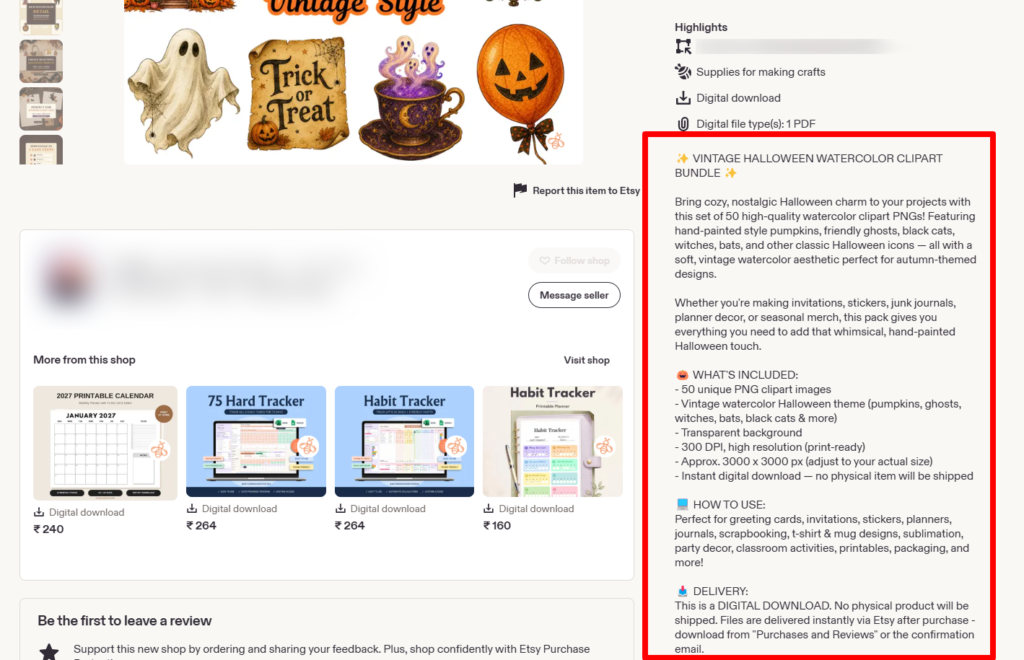
A clear product page can include:
- A specific headline that describes the product
- A short explanation of who it is for
- A preview of the pages, templates, or files
- A list of what the customer receives
- Answers to common questions
- A clear purchase button
Be honest about what the product can do. Avoid claims such as “guaranteed to make you money” unless you can substantiate them and they are allowed under the rules that apply to your business.
7. Promote It Where Your Audience Already Spends Time
A good product still needs to be discovered. Start with the channels you can use consistently. You could share useful tips on social media, publish videos, send an email to your subscribers, or create blog posts that answer questions related to the product.
If you use Pinterest, make Pins that address specific questions and link to the product page or a helpful article that features it. Our guide to Pinterest keyword research can help you find topics people search for, while our free Pinterest strategy guide covers account setup and content planning.
Don’t rely on one post or one Pin to make all your sales. Keep learning which topics bring relevant visitors and which pages lead to clicks, signups, or purchases.
Why Starting a Blog Can Help You Sell Digital Products
You can sell a digital product without owning a blog, but a blog gives you a place to publish helpful content that people can find through search engines and Pinterest. Your articles can answer questions, introduce your product naturally, and bring readers to your sales page.
A blog can also support more than one income stream over time. Along with your own product, you may be able to earn through affiliate marketing, display ads, sponsored content, or services. Each option takes work and has its own requirements, but a blog gives you a central place to build your content and audience.
If you’re new to blogging, start with our step-by-step guide on how to start a blog and make money from blogging. It covers choosing a niche, setting up a WordPress blog, finding traffic, and monetizing your content.
Start a WordPress Blog With Hostinger
To create a self-hosted WordPress blog, you’ll need a domain and web hosting. Hostinger is one option you can consider. Its plans and features vary, and introductory pricing may require paying for a longer term upfront. Check the current price, renewal rate, included features, and refund terms before choosing a plan.
Explore Hostinger hosting plans. If you purchase through this referral link, DuoThrivers may earn a commission at no extra cost to you.
Once your blog is set up, you can publish helpful articles around the problem your product solves. For example, if you sell a meal-planning workbook, you might write articles about planning meals on a budget, organizing a weekly menu, or making a grocery list.
For more detail on attracting search traffic, see our guide to SEO for bloggers. To compare income options for a website, read our article on monetizing your blog.
A Simple Blog Content Plan for Your First Product
Start with a few useful articles that answer questions people may have before buying your product. A simple content plan could include:
- A beginner’s guide: Explain the main topic and help readers take the first step.
- A common problem article: Address one challenge your product helps solve.
- A comparison or checklist: Help readers choose tools, methods, or next steps.
- A product page: Explain exactly what your product includes and how to buy it.
Link these pages to one another where it makes sense. A helpful article can point to your product page, while the product page can link back to a tutorial or FAQ. This helps readers find the next step without making every article feel like an advertisement.
How to Improve After Your First Sale
Your first sale is useful feedback, but it doesn’t automatically prove that the product will sell consistently. Keep track of what brought the buyer to your page and what questions they had.
Then review a few things:
- Which article, Pin, or post sent the visitor?
- Did the product page explain the offer clearly?
- Did the buyer have any difficulty downloading or using the product?
- What questions did they ask before purchasing?
- Could a small improvement make the product easier to use?
Use that feedback to improve the product and its sales page. If you’re getting visitors but few purchases, revisit the product’s fit, price, preview images, and description before assuming you simply need more traffic.
Common Mistakes to Avoid
- Creating the product before checking demand: Talk to potential buyers and review the questions they already ask.
- Making the first product too large: Start with a focused version you can finish and improve.
- Copying a competitor: Use market research to find an opportunity, then create your own original product.
- Ignoring the sales page: Explain what the buyer gets and how it helps.
- Expecting instant passive income: Product creation, promotion, support, and updates all take time.
- Counting gross sales as profit: Account for platform fees, payment processing, refunds, taxes, and other costs.
Want Pinterest traffic without doing the pinning?
Our team at ThriversEdge handles keyword research, Pin design and scheduling for bloggers and online sellers. Start with a $99 account audit, get Pins designed from $1 each, or hand over the whole account.
Final Thoughts
You don’t need a large product catalog to begin selling online. Choose one problem, create a useful solution, set up a clear product page, and promote it where your audience looks for help.
If you want to build a longer-term source of traffic and have more control over how you promote your products, starting a blog is a strong next step. Read our guide on how to start a blog, explore the digital product ideas list, and use the Hostinger referral link above if its current plans are a good fit for your needs.
Note: Some of the links on this page are affiliate links, which means we may earn a small commission if you choose to make a purchase through them-at no extra cost to you. We only recommend products and services we genuinely believe in and find useful.